Youchat: A Modern Display Font for Editorial Projects
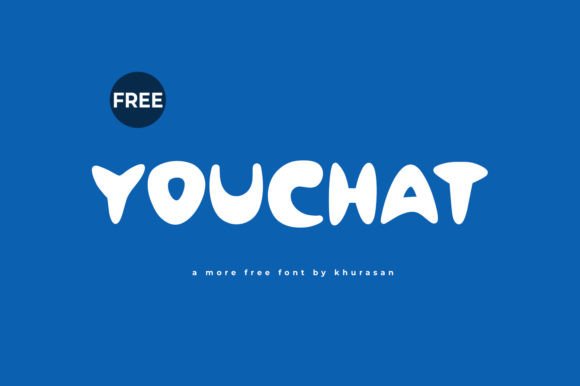
There’s something about the right font that can transform a design from ordinary to unforgettable. I recently found myself in the midst of redesigning the header for a lifestyle blog, and it was during this process that Youchat caught my eye. As a display font with a modern and cute aesthetic, it felt like the perfect match for a publication that blends creativity with approachability.
A Visual Character That Speaks Volumes
Youchat has a gentle rhythm and a soft personality that makes it ideal for editorial projects where tone matters as much as typography. Its curves are not too exaggerated, and its structure is clean enough to maintain readability without sacrificing charm. It feels like a warm welcome, making it especially suitable for content that aims to connect with readers on a personal level.
The font carries a mood that’s both playful and professional, which is rare to find in a single typeface. It doesn’t shout or whisper—it simply communicates. This balance makes it a great candidate for magazine covers, blog headers, and even book titles that need to stand out but still feel inviting.
Real-World Application in Editorial Design
I tested Youchat in a few real publishing scenarios, and each time it performed well. For instance, when designing a cover for a recipe ebook, the font added a touch of whimsy that complemented the colorful food photography. The title stood out beautifully, drawing the reader’s attention without overwhelming the layout.
In another case, I used Youchat for pull quotes in an editorial feature page. The font’s distinctiveness helped these quotes pop while maintaining a cohesive look with the rest of the article. It wasn’t just decorative; it contributed to the visual hierarchy and guided the reader’s eye naturally through the content.
For a digital magazine layout, I paired Youchat with a clean sans serif font for body text. The contrast worked well, allowing the display font to serve as a focal point while ensuring the main content remained easy to read. This kind of font pairing is essential in editorial design to maintain clarity and visual interest.
Considerations for Readability and Use Cases
While Youchat shines in display roles, it’s important to recognize where it may not be the best fit. Its expressive nature makes it less ideal for long-form reading or dense paragraphs. Body copy, small captions, and formal reports might suffer if Youchat were used in those contexts. Instead, it works best as a headline font, section opener, or decorative accent.
For screen reading, especially on mobile devices, I noticed that Youchat remains legible at smaller sizes, though it’s always wise to test it across different platforms. When exporting to PDF or print materials, the font holds up well, maintaining its character without any distortion or loss of quality.
If you're using it in a course PDF or printable planner, consider how much text you’re including. Youchat is more suited for short bursts of text rather than lengthy passages. However, in a coaching workbook or wedding guide, it could add a unique flair to chapter headings or section titles, enhancing the overall brand identity.
Practical Tips for Using Youchat
Before incorporating Youchat into your editorial projects, take a moment to review the included styles, alternates, and ligatures. These features can significantly enhance your designs by adding subtle variations and improving typographic flow.
Also, ensure that the font supports the languages and characters you’ll be using. If you’re creating content for a global audience or working on multilingual publications, confirming this detail is crucial.
Finally, don’t forget to check the licensing terms. If you’re planning to use Youchat in ebooks, templates, paid newsletters, or client projects, make sure you understand the commercial usage rights. Some free fonts have restrictions that could limit their application in certain contexts.
Youchat is a versatile and charming display font that adds character to editorial projects without compromising readability. Whether you're designing a blog header, crafting a newsletter graphic, or building a printable planner, it offers a modern aesthetic that aligns well with today’s creative trends. With thoughtful pairing and strategic use, it can become a valuable asset in your typography toolkit.